When a Search or Download Stalls: A Fix-It Decision Tree
Most problems people hit on a music search and download site are not mysterious. They are a small set of familiar causes: a query that is too specific, a browser holding onto old data, a file format the device refuses to open, or a temporary network hiccup. The trick is to stop guessing and follow a path from symptom to cause to fix.
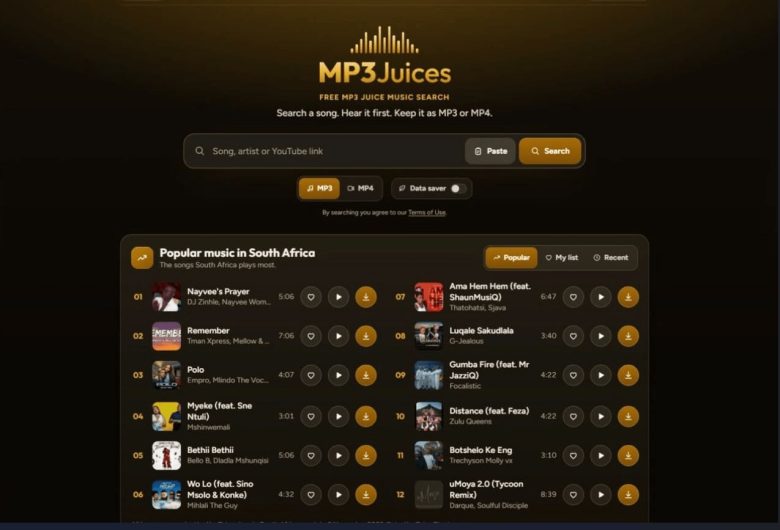
This guide works like a decision tree. Find the symptom you are seeing, follow the branch that matches it, and try the cheapest fix first. The platform in question, mp3juices.art, is a free web-based music search and download tool, so almost every issue can be diagnosed without installing anything or creating an account.
Start With the Symptom, Not the Site
Before changing settings, name the exact failure. “It doesn’t work” splits into three very different problems: the search returns nothing, the download begins but never finishes, or the file arrives and will not play. Each has its own causes and its own fixes.
Write down what you expected and what actually happened. Note the song title, the format you chose, the browser you used, and whether the problem repeats with a different track. That short record turns a vague complaint into a testable case, and it is the single most useful habit in support work.
One symptom at a time keeps the diagnosis honest. If you change three things at once and the problem disappears, you never learn which change mattered.
Symptom One: The Search Returns Nothing
An empty results page is the most common complaint, and it is almost always about the query rather than the service. Search tools match text, so punctuation, featured artists, remix tags, and extra words can all narrow the field to zero.
Branch A: The query is too specific
Strip the query back to the artist name and one or two words of the title. Remove brackets, “feat.” credits, years, and words like “official” or “lyrics”. If results appear, the original query was simply too narrow.
Branch B: The spelling is off
Artist names are frequently misspelled, transliterated differently, or written with symbols. Try the most common spelling, then a shorter fragment of the name. Searching for a distinctive word from the title often works better than the full phrase.
Branch C: The page itself did not load properly
If the search box responds but nothing happens, reload the page and try again. A stale tab or a half-loaded script can leave the interface looking normal while doing nothing. Open a fresh tab and repeat the search before assuming the track is unavailable.
- Simplify the query to artist plus one keyword.
- Check spelling and try alternate transliterations.
- Reload in a new tab to rule out a broken page state.
- Try a different song by the same artist to confirm the tool is responding.
Symptom Two: The Download Starts but Never Finishes
A stalled download is usually a connection or browser issue rather than a problem with the file itself. The progress bar sits still, the estimated time climbs, or the transfer dies at the same percentage every time.
Check the connection first
Switch networks briefly, or toggle Wi-Fi off and on. If a phone on mobile data completes the download that failed on home Wi-Fi, the router or the local network is the cause. Restart the router if the pattern repeats.
Clear the browser’s stale state
Old cookies and cached scripts can interrupt a transfer. Clear the cache for the site, or open the page in a private window to test with a clean slate. Disable extensions that block scripts or rewrite downloads, then retry.
Change the format or quality
A large MP4 file takes longer and is more exposed to interruptions than a compact MP3. If the video version keeps stalling, switch to audio and see whether the smaller file completes. The platform lets you preview a track before downloading, so confirm the song is the right one before committing to a long transfer.
Retry once before you troubleshoot further. Many stalled transfers are one-off network blips, and a second attempt succeeds without any changes.
Symptom Three: The File Arrives but Will Not Play
This is the branch where people blame the download when the real issue is the player. A file that downloads completely but shows an error, plays silently, or opens the wrong app is usually a format or container mismatch.
Confirm what you actually downloaded
Check the file extension. An MP3 should open in any music player; an MP4 is a video container and needs a video-capable app. If you chose MP4 expecting audio, that mismatch alone explains the confusion.
Try a different player
Open the file in a second application. If it plays there, the original player lacks the right codec or has a corrupted cache. Updating the player or switching to a mainstream one resolves most of these cases.
Re-download if the file is truncated
A file that is smaller than expected, or that fails at the same timestamp every time, was probably cut short. Delete it and download again on a stable connection. Partial files are the most common cause of “unplayable” reports.
If the file plays on a computer but not on a phone, the phone’s storage or media scanner is the next suspect. Free up space and rescan the media library before downloading again.
Settings and Habits That Prevent Repeat Problems
Most repeat offenders are habits, not bugs. A few small adjustments remove the majority of future stalls.
Use the built-in discovery tools
Browsing by genre, artist, or charts is often faster than typing a precise query, and it surfaces tracks you would have missed. The personal list feature lets you keep candidates in one place so you can preview and compare before downloading.
Respect the data budget
On mobile connections, a data saver mode reduces the size of previews and pages. Turn it on when you are browsing rather than downloading, and save full transfers for Wi-Fi.
Keep the browser current
Older browsers handle large transfers and modern scripts poorly. An up-to-date browser with a small set of extensions is the most reliable environment for any web-based download tool.
| Symptom | Most likely cause | First fix |
|---|---|---|
| Empty results | Over-specific query | Simplify to artist plus keyword |
| Stalled download | Network or stale browser state | Retry, then clear cache |
| Unplayable file | Format or player mismatch | Check extension, try another player |
When to Escalate: A Short Checklist
Some problems genuinely sit outside your control. Before you conclude that, run through a short checklist so you can describe the failure precisely if you need help.
- Reproduce the issue with a different song and a different browser.
- Note the exact query, the format chosen, and the point where it failed.
- Test on a second network to rule out local connectivity.
- Confirm the file size and extension of anything that downloaded.
- Check whether the same track works when previewed rather than downloaded.
If the problem survives all five steps, it is likely a temporary service-side issue or a track that is not available in the format you want. Waiting and retrying later is often the correct answer, and it costs nothing.
Documentation beats repetition. A short note of what you tried saves time the next time the same symptom appears.
Frequently Asked Questions
Why does my search show no results even for popular songs?
Usually the query is too narrow. Remove featured artists, years, and bracketed tags, then search with just the artist and a keyword from the title. If that works, the original phrasing was the problem.
Why does a download stop at the same point every time?
A repeated stop at the same percentage points to a connection interruption or a browser extension interfering with the transfer. Retry on a different network, clear the site’s cache, and disable download-related extensions before trying again.
Why will my downloaded file not open?
Check the extension first. MP3 files open in music players, while MP4 files need a video-capable app. If the file is smaller than expected, it was probably truncated and should be downloaded again on a stable connection.
Do I need an account or software to use the site?
No. The service runs in the browser without installation or registration, which is also why most fixes involve browser settings and network conditions rather than account configuration.